Deploy by Von
Simple WordPress deployment, on your own PC or server.
Spin up a new WordPress site with one command. Caddy, Docker, PHP-FPM, and Percona are wired up for you. No bloated control panel. No endless setup routine. Just a clean stack you control.
If you know how to SSH into a server, you already know enough to use Deploy by Von. Bootstrap the machine once, run one command for each new site, and keep your hosting stack simple.
System requirements
Every PC in the world can run WordPress using this script.
Deploy by Von is made for people who are comfortable connecting to a Linux server and running a command. You can also use your Windows PC too! Just download Ubuntu on Windows Store and run the commands.
You should also have a domain ready if you want to use a live public site with free HTTPS support. For local or temporary work, just use local mode and skip DNS.
Installation
I built a very powerful, and special tool that you’ll love!
- Pick Setup Server First from dropdown once you VISIT THIS PAGE and run that command.
… or Manually Install:
- Bootstrap the server once:
curl -fsSL https://get.1776.cloud/wordpress/bootstrap.sh | sudo bash - Deploy a new localhost site using:
curl -fsSL https://get.1776.cloud/wordpress/deploy.sh | sudo bash -s -- --localhost - Deploy a new live site using:
curl -fsSL https://get.1776.cloud/wordpress/deploy.sh | sudo bash - Remove a site:
curl -fsSL https://get.1776.cloud/wordpress/remove.sh | sudo bash -s -- example.com --yes - Visit the website anytime!
That is the whole idea. Set up once. Deploy when needed. Keep moving.
How do updates work?
You update two things:
- The Deploy system itself.
- Your WordPress sites.
If the Deploy scripts change, you just re-upload the latest version and run them again.
Each WordPress site is updated the normal WordPress way: core, plugins, and themes are updated manually inside the installation.
Nothing phones home. No external pings. No tracking.
My favorite features:
- Racecar Fast Websites!
- Preload your favorite plugins and theme before launch.
- Free SSL setup for the green padlock.
- Works well with Cloudflare or any registrar.
- (the best for last) Ready for high availability when you need it later.
- If one server goes offline, Caddy can send traffic to another server running a cloned WordPress site. That kind of HTTP failover is much faster than waiting on DNS TTL changes from services like Route 53, Bunny.net DNS, DNS Made Easy, or CF Load Balancing.
What is it?
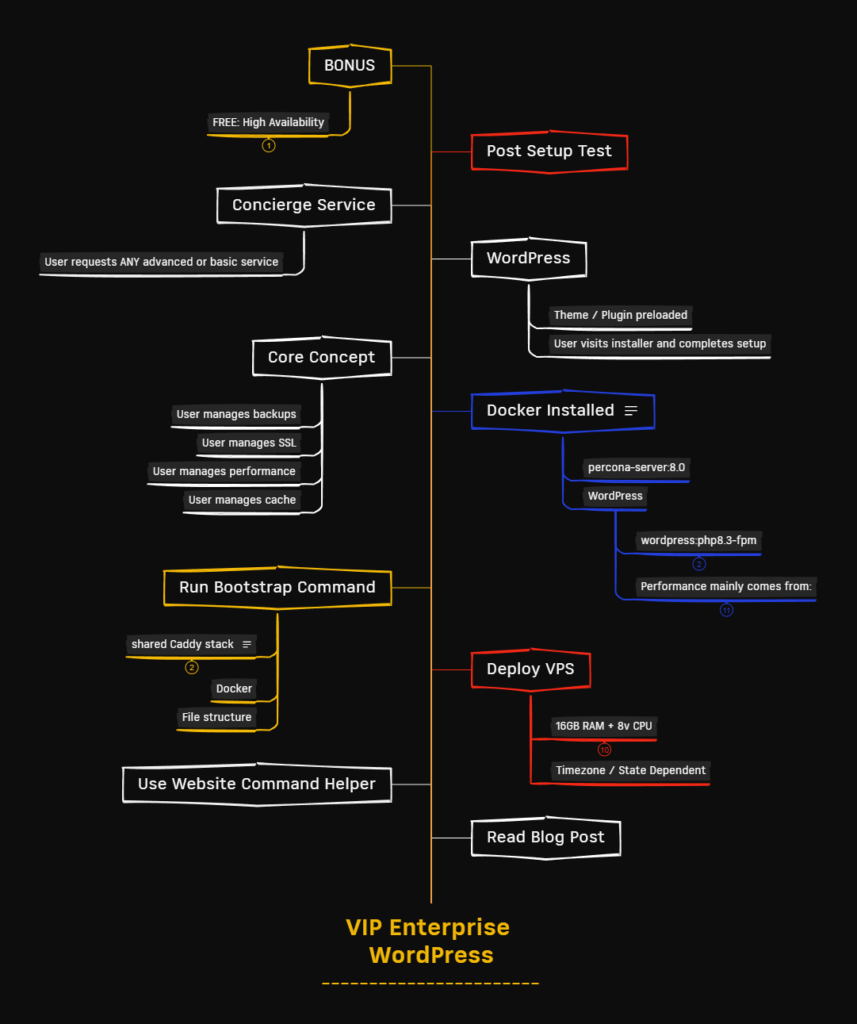
Deploy by Von is an installable, self-hosted WordPress install system for Home, VPS or dedicated server setups.
It gives you a repeatable way to launch WordPress sites without rebuilding the same stack by hand every time. Each site gets its own WordPress container, its own database container, and a shared Caddy proxy in front, future-proofed with High Availability!
That means less drift, less mystery, and less time wasted doing the same setup work over and over again.
And because you run it on your own server, you stay in control. Your stack, your server, your workflow.
But we already have a hosting panel
Yes, and panels usually come with the worst feature in modern software: more layers than you asked for.
They hide the real stack. They add overhead. They turn simple server work into a mess of clicks, toggles, and “helpful” abstractions that are only helpful until something breaks.
If you are comfortable in a terminal, you probably do not need more software standing between you and your own machine.
Deploy by Von keeps the setup understandable. You can see what it does, change what you want, and build on top of it without fighting someone else’s idea of how hosting should work.
What you get
- One server bootstrap step.
- One command to deploy a new site.
- One shared Caddy reverse proxy.
- One WordPress container per site.
- One Percona database container per site.
- Simple profiles for different site sizes.
- A setup that stays close to the metal.
The basics done right
- Clean WordPress stack.
- Docker-based setup.
- Caddy in front.
- PHP-FPM behind it.
- Per-site isolation.
- Lean defaults.
- Fast repeat deployments.
No giant platform. No mystery box. No paying forever just to create the same WordPress site again and again.
VPS = 16GB 8vCPU
Designed for 7 to 10 websites, each profile will automatically scale and optimize server resources. Here is the specs table comparing the profile options configured in Deploy by Von script:
| Parameter | Tiny --tiny | Standard (Default) | Pro --woo |
|---|---|---|---|
| PHP Memory Limit | 256M | 256M | 512M |
| PHP Upload Limit | 256M | 512M | 512M |
| PHP Post Max Size | 288M | 544M | 544M |
| PHP OPcache Memory | 128MB | 192MB | 256MB |
| FPM Process Manager | ondemand | dynamic | dynamic |
| FPM Max Children | 6 | 12 | 20 |
| FPM Start / Spare Servers | N/A (Ondemand) | Start: 3Min Spare: 2Max Spare: 5 | Start: 5Min Spare: 4Max Spare: 10 |
| FPM Idle Timeout | 10s | N/A (Dynamic) | N/A (Dynamic) |
| FPM Max Requests | 500 | 500 | 500 |
| Database Max Connections | 50 | 75 | 125 |
| Database Buffer Pool Size | 256M | 384M | 768M |
| Database Log File Size | 128M | 128M | 256M |
It fits in a lot of places
As your main deployment workflow
Tired of rebuilding the same WordPress stack every time you launch a site? Use Deploy as the standard way you bring sites online.
As your hosting system
If you manage sites for clients, consistency matters. Deploy gives you one repeatable pattern instead of ten slightly different snowflake setups.
As your internal tool
You get a setup you can inspect, edit, and improve. That means you can make it fit the way you actually work instead of adapting your workflow to some hosting panel.
For small sites
Need a lighter footprint? Use the smaller profile and keep resource usage under control.
For standard business sites
Most sites do not need a circus. They need a clean, dependable setup that is easy to launch and easy to maintain.
For WooCommerce builds
Some sites need more room. Deploy includes a heavier profile for stores and larger workloads.
Frequently asked questions
Is this a hosting panel?
No. It is a deployment system.
The point is not to bury your server behind another dashboard. The point is to make repeatable WordPress deployment fast and understandable.
Do I need to install something on every computer?
No.
You install Deploy by Von on a computer or server you control. After that, you run commands against that server when you want to create or remove sites.
Do I need Docker experience?
No.
If you are comfortable with basic Linux server work and know how to SSH into a box, you are already 90% there.
Is this for WordPress only?
Yes.
It is not trying to be everything for everyone. It is trying to make WordPress deployment simple.
Can I customize it?
Yes.
That is one of the main reasons to use something like this in the first place. You can inspect the scripts, change the defaults, tune the stack, and make it fit your own hosting model.
Is this good for client hosting?
Yes, especially if you want one repeatable way to launch and manage WordPress sites.
Consistency saves time. Consistency also makes problems easier to find when something goes wrong.
Does it support different site sizes?
Yes.
Deploy by Von includes different profiles so you can choose a lighter setup for smaller sites, or a heavier one for WooCommerce and busier installs. For example, this website https://get.1776.cloud/ uses TINY profile.
Is this meant for beginners?
I think so.
Deploy by Von is for people who prefer, in this order:
- Running local software.
- Using shared hosting.
- Renting a VPS.
- Colocating a dedicated server.
If you like terminals, servers, and understanding how things work, you will probably feel at home.
Get it. Do it. Results!!
Use Deploy when you want WordPress hosting to feel simpler, not heavier.
Run the bootstrap once. Launch sites when you need them. Keep the stack clear, lean, and yours.